This week two critical remote code execution vulnerabilities in PHP itself were disclosed: CVE-2026-109618 and CVE-2026-109619, nicknamed “PHP2Shell”. These aren’t bugs in a plugin or a theme, they’re in the PHP core engine, so anything running on PHP (WordPress, Drupal, Joomla and the rest) was potentially exposed. Details leaked before the coordinated release, PHP pushed out emergency patches on 21 October, and there were already reports of active exploitation attempts.
Yes, I patched. But it made me ask a question I’d been avoiding for a long time:
Why am I still running a PHP server at home for a blog that is essentially an archive?
A bit of history
This blog started life in 2011 as WeakestLync.com, mostly writing up Lync Server 2010 problems as I hit them on customer sites. It followed me through Lync 2013, Skype for Business, Cloud Connector Edition and on to Microsoft Teams and AudioCodes.
At one point it was getting over 100,000 unique visitors a year, which still amazes me. A lot of those old Lync and Skype for Business posts are well past their sell-by date, but people still land on them, and I still get the odd message saying a script helped someone out. I don’t post very often these days, but I didn’t want to lose any of it.
So the goal of this migration was simple: preserve the blog, keep every old URL working, and stop it being a security liability.
The old setup
For the last few years the blog has been self-hosted in my homelab. An Intel N100 mini PC sits on my desk running Proxmox. pfSense acts as my “home DMZ”, and the site is published to the internet using a Cloudflare Tunnel, so there are no inbound ports open on my home connection.
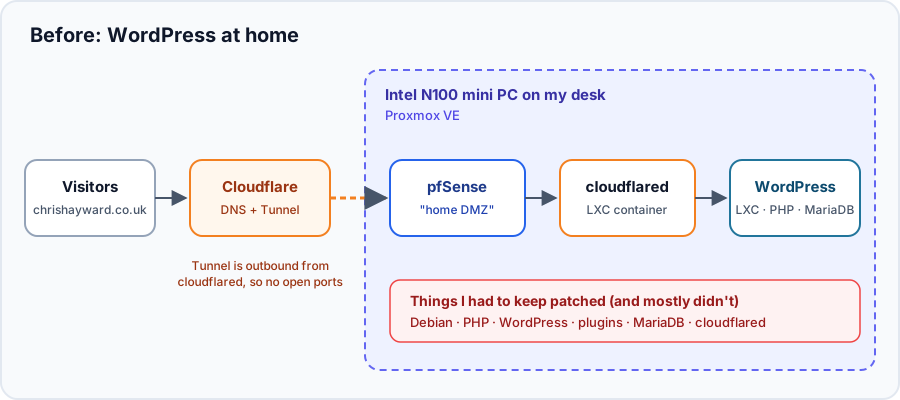
The old setup: WordPress in an LXC container at home, published via a Cloudflare Tunnel
On paper it’s a nice setup. In reality:
- I rarely logged into WordPress, so plugins and themes were rarely updated
- I updated the LXC container even less
- It’s a full LAMP-style stack (Debian, PHP, MariaDB, WordPress, plugins, cloudflared) all needing patching, for a site that changes a few times a year
pfSense and the tunnel limit the blast radius, but a vulnerability like PHP2Shell is exactly the sort of thing that makes “I’ll patch it at the weekend” a bad plan.
Attempt #1: January 2023
This isn’t the first time I’ve tried this. In January 2023 I tried moving to Hugo and hosting on an Azure Static Web App. I used a WordPress plugin to export everything to Markdown, then tried to tidy up the output by hand.
It didn’t go well:
- Image links were all over the place. Some pointed at the old server IP address from years ago, some at the full
https://chrishayward.co.uk/wp-content/...URL, and some at relative paths like../../../../../uploads/2016/01/image.jpgwhich broke as soon as Hugo changed the page structure. - Special characters. Titles came out with HTML entities like
–instead of dashes. - Code blocks. Nearly every script post still had tags from the old Crayon syntax highlighter plugin, like
<pre class="lang:ps decode:true">, stuck inside the code. - Categories and tags were exported in a format Hugo ignored.
Fixing 83 posts by hand was never going to happen, so it sat there half-finished for nearly three years. The Static Web App even stayed live, quietly serving a page titled “Mainroad” (the theme name) to nobody.
Attempt #2: October 2026, with Claude Code
This time I used Claude Code and treated it like a migration project rather than a copy and paste exercise. I gave it the folder with my 2023 attempt, told it the WordPress server was on my network, and asked for a plan first.
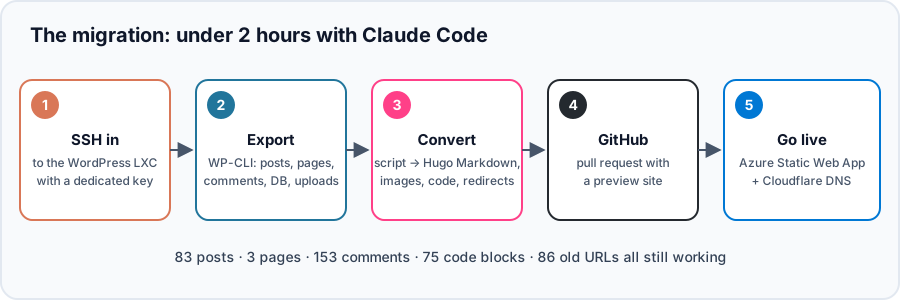
The whole migration, end to end, in under 2 hours
1. SSH to the WordPress container
Claude Code generated a dedicated SSH key just for the migration, which I added to the container. Small confession: before I’d given it a username, it tried a couple of the obvious ones and fail2ban promptly banned my laptop. A slightly embarrassing way to find out my home DMZ was doing its job! We tracked it down to the f2b-SSH iptables chain in the container, removed the ban and carried on.
2. Export everything
Rather than relying on a plugin, it went straight to the source using WP-CLI, which was already on the server:
wp export --dir=/tmp/blogexp --filename_format=site.wxr.xml
wp db export /tmp/blogexp/wordpress-db.sql
It copied the wp-content/uploads folder too, along with a full database backup for safe keeping.
3. Convert to Hugo
This is where it earned its keep. Instead of fixing posts by hand it wrote a conversion script, ran it, checked the output, and kept going until everything came across cleanly:
- Every image link, whether it used the old IP, the full URL or a relative path, now points at
/wp-content/uploads/.... Out of 1,633 files in the uploads folder, only 275 were actually needed (WordPress keeps lots of resized copies of every image). - 75 code blocks converted to proper fenced code blocks with the right language, so PowerShell and SQL are highlighted properly.
- Titles and special characters decoded properly.
- 153 comments and 47 pingbacks kept as read-only threads under each post (without email or IP addresses).
- Embedded tweets saved as static quotes. Two had since been deleted from X, so those fall back to a link.
- Every old URL still works: posts are still at
/YYYY/MM/DD/post-name/, and old/category/,/tag/and/feedlinks redirect to their new equivalents.
It then built the site and checked it: all 86 old post and page URLs present, and 0 broken internal links or images.
4. GitHub and a preview site
The output went into my existing GitHub repo on a branch, with a pull request. Azure Static Web Apps automatically builds a preview site for every pull request, so I could click around the whole blog on a temporary URL before anything went live.
One gotcha worth sharing: Azure’s built-in build system (Oryx) runs on an older Debian image that can’t run current versions of Hugo, so the first build failed. The fix is to build Hugo in GitHub Actions and just hand Azure the finished site:
- name: Install Hugo
  run: |
    wget -q -O "$RUNNER_TEMP/hugo.deb" "https://github.com/gohugoio/hugo/releases/download/v${HUGO_VERSION}/hugo_extended_${HUGO_VERSION}_linux-amd64.deb"
    sudo dpkg -i "$RUNNER_TEMP/hugo.deb"
- name: Build site
  run: hugo --gc
- name: Deploy
  uses: Azure/static-web-apps-deploy@v1
  with:
    azure_static_web_apps_api_token: ${{ secrets.AZURE_STATIC_WEB_APPS_API_TOKEN }}
    action: "upload"
    app_location: "public"
    skip_app_build: true
I also switched to the PaperMod theme, which gives dark mode, search, an archive page and proper SEO tags out of the box.
5. Go live
Once I was happy with the preview I merged the pull request, added chrishayward.co.uk as a custom domain on the Static Web App, and updated DNS in Cloudflare. After Azure validated the domain, a final check against the live site confirmed every old URL was still working.
The new setup
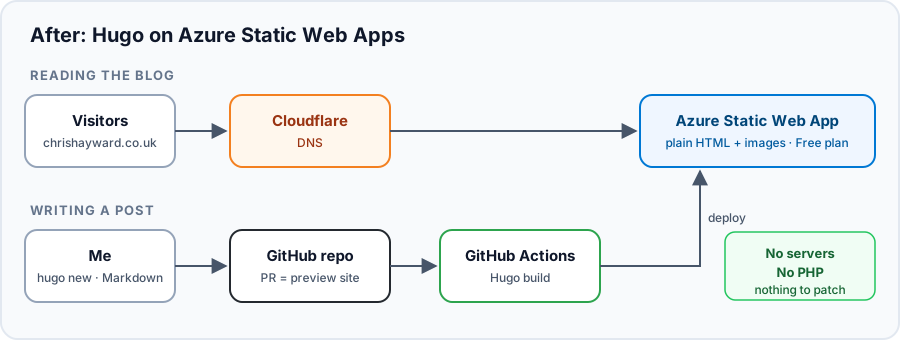
The new setup: no servers, no PHP, nothing to patch
The blog is now just HTML, CSS and images on an Azure Static Web App, on the Free plan. There’s no PHP, no database and no admin login page for anyone to brute force. Writing a new post is a Markdown file in GitHub, and every pull request gets its own preview site.
The best bit? My WordPress LXC container can now be powered off in Proxmox. One less thing to patch on the N100.
Was it worth it?
Absolutely. Something I’d put off for nearly three years was done in an evening. Start to finish, it took under 2 hours, and most of that was me reviewing the preview site and making decisions about the theme.
A few things I’d call out if you’re thinking of doing the same:
- Use WP-CLI, not export plugins. The standard WordPress export has everything you need, including comments.
- Script the conversion. Don’t fix posts by hand; fix the script and run it again.
- Check every old URL. Your old links are what people (and Google) find you by.
- Use pull request previews. Being able to see the whole site on a temporary URL before going live takes the risk out of it.
If you’re still running a WordPress site you hardly ever update, PHP2Shell is a good excuse to ask whether it really needs to be dynamic at all.