Here’s a problem I suspect a lot of people with solar, a home battery and an EV are quietly living with:
Every time the car started charging, my home battery emptied itself into the car.
Off-peak electricity at 6.6p, carefully stored in a battery, then shovelled into an EV at up to 4.8 kW, leaving the house to run on 35p electricity for the rest of the evening. Not ideal.
This post covers how I fixed it using plain Home Assistant automations (no Predbat), and how I used Claude Code to do most of the investigation and build.
The setup
- Solar: 8 × Aiko 485 W panels on one roof face (3.88 kWp)
- Battery: Sigenergy SigenStor with a 6 kW hybrid inverter and ~9 kWh of battery
- EV charger: Wallbox Pulsar Plus, controlled by Octopus Intelligent Go (IOG)
- Cars: two EVs (neither is in Home Assistant; Octopus controls the charging via the Wallbox)
- Tariff: Intelligent Octopus Go: 6.6p off-peak (23:30–05:30, plus any smart charge slots Octopus gives the car), 35.45p the rest of the day, and 12p export
- Home Assistant running on a box in the house
Why the battery feeds the car
The proper fix for this is electrical: put the EV charger on the grid side of the battery’s CT clamp, so the inverter never “sees” the car.
I can’t easily do that. My solar taps into the meter tails, and the Sigen’s CT clamp sits there too. My consumer unit is in a different room, and that’s where the car charger cable goes. So as far as the battery is concerned, a 7.4 kW car is just a very big kettle, and it does what batteries do: tries to cover it.
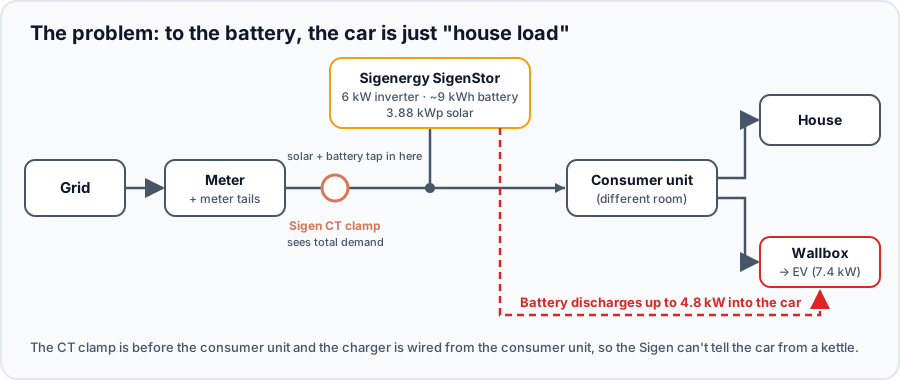
The CT clamp can’t tell the car from the house
Re-routing the charger supply would mean an electrician and some cable runs between rooms. Software it is.
What used to work (and why it stopped)
For months I had two simple automations:
- Wallbox charging power above 1 kW: set the Sigen’s ESS max discharging limit to 0 kW
- Wallbox below 1 kW for a minute: set it back to 10 kW
The battery stayed in Sigen’s AI Mode the whole time and it worked beautifully…
…until late September. Then I noticed the battery happily discharging into the car again, even though the automation was firing every time.
This is where Claude Code came in (more on how below). It dug through Home Assistant’s long-term statistics and found the exact behaviour change: up to mid-September the battery sat idle while the car charged, and from around 26 September it discharged into the car at 2–4.8 kW with the limit set to 0. It then read the registers straight off the Sigen over Modbus to prove the setting really was being written:
| What we checked | Result |
|---|---|
| ESS max discharging limit (register 40034) | 0.1 kW ✅ written correctly |
| Remote EMS (register 40029) | off |
| Battery while the car charged | discharging 4.1 kW ❌ |
Same result in AI Mode and in plain Self-Consumption. The conclusion: on current Sigen firmware, the discharge limit is only respected when Remote EMS is enabled. A quick test with Remote EMS switched on and the limit at 0 had the battery sitting at exactly 0.0 kW within seconds.
Gotcha: switching Remote EMS back off afterwards dropped the system into Self-Consumption, not AI Mode. So “turn on Remote EMS only while the car charges” wasn’t an option either; I’d have to put AI Mode back in the app every time.
So I made a decision: leave Remote EMS on permanently and let Home Assistant be the brain. Goodbye AI Mode.
The plan: keep it simple
I looked at Predbat, which is brilliant and does support Sigenergy. But it’s a big, clever system, and what I actually needed was much simpler:
- Charge the battery to 100% every night at 6.6p (23:30–05:30)
- Self-consumption the rest of the day: solar first, then battery, grid last
- If the car is charging at the day rate, don’t let the battery feed it
- If Octopus gives the car a cheap daytime slot, charge the battery from the grid too, because during a smart-charge slot the whole house gets the 6.6p rate
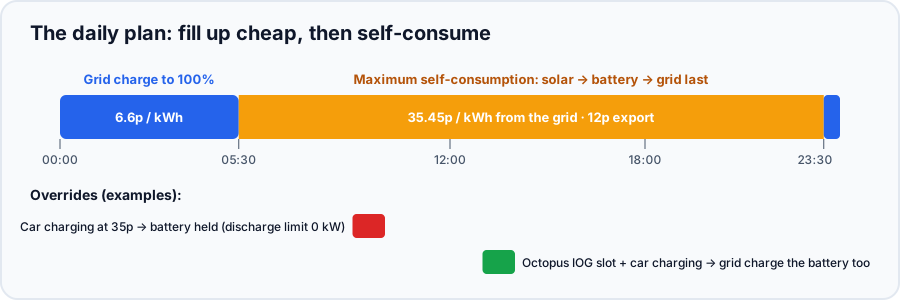
The whole strategy on one line
Why I don’t try to predict the solar
A lot of battery setups (including Predbat) try to leave room in the battery for tomorrow’s solar. I deliberately don’t. I just fill it every night.
- In winter my 3.88 kWp array does 1–2 kWh a day. The 9 kWh battery is the main event, not the solar.
- In summer, if the battery is full and the sun is out, the surplus is exported at 12p. Having filled up at 6.6p, that’s still a good deal.
- Every forecast is wrong some of the time. “Always full at 05:30” is never wrong, and I never end up buying 35p electricity at teatime because a forecast was optimistic.
It’s less clever, but it’s predictable, and predictable is what I want from something that controls a battery.
How it fits together
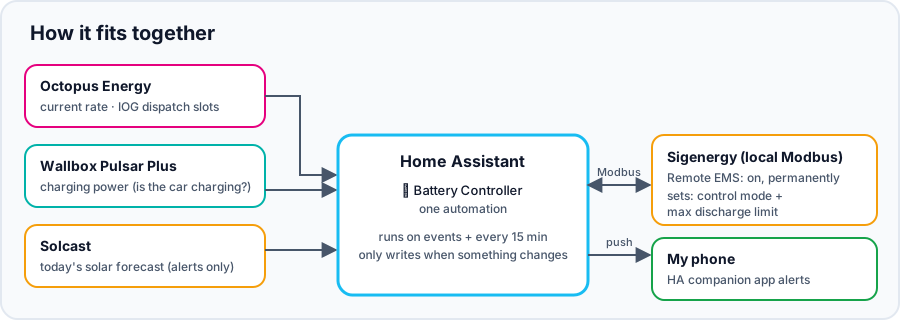
Three integrations, one automation
Sigenergy (local Modbus, Remote EMS enabled)
I use the Sigenergy Local Modbus integration from HACS. It talks to the Sigen directly over your LAN, no cloud. Two things to note:
- Controls are read-only by default, so you need to allow writes in the integration’s settings
- Once “Remote EMS controlled by Home Assistant” is on, you get a Remote EMS control mode selector. The two modes I use are Command Charging (Grid First) and Maximum Self Consumption
Octopus Energy
The Octopus Energy integration by BottlecapDave gives you the current rate and your Intelligent Octopus dispatch slots. A few settings matter for IOG:
- Planned and started dispatches will turn into off peak rates: so the “current rate” sensor drops to 6.6p during a daytime smart charge slot. This is what the automation keys off.
- Enforce intelligent cap: Octopus only gives you 6 hours of cheap smart charging a day. With this ticked, the rate shows 35p again once you’re over the cap, so the battery won’t grid-charge at what’s actually the day rate.
- Manually refresh intelligent dispatches: Octopus rate-limits their API, so I left this on and added a small automation that refreshes the dispatches when the car starts charging and every 30 minutes while it charges (well inside the limit of 20 an hour).
Wallbox
The built-in Wallbox integration gives me charging power, which is how Home Assistant knows the car is charging. It’s cloud based and only updates about once a minute, so for the first minute of a charge the battery can still feed the car. That costs me about 3p a time, so I’ve decided I can live with it.
Solcast
Solcast gives me a solar forecast. It doesn’t control the battery (see above), it’s just used for a morning notification (more below).
The controller
Rather than lots of little automations fighting each other, it’s one automation that works out what the battery should be doing right now, and only touches the Sigen if that’s different from what it’s doing.
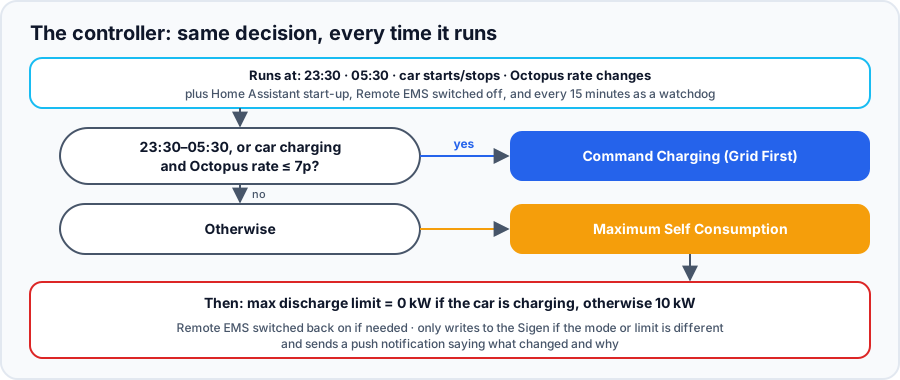
The decision the controller makes every time it runs
Here’s a cut-down version of the YAML. Swap in your own entity IDs; the Octopus and Wallbox ones include your meter and charger serial numbers.
alias: "🔋 Battery Controller (Remote EMS)"
mode: queued
triggers:
  - trigger: time
    at: "23:30:00"
  - trigger: time
    at: "05:30:00"
  - trigger: numeric_state
    entity_id: sensor.wallbox_charging_power
    above: 1
  - trigger: numeric_state
    entity_id: sensor.wallbox_charging_power
    below: 1
    for: { minutes: 1 }
  - trigger: state
    entity_id: sensor.octopus_energy_electricity_current_rate
  - trigger: homeassistant
    event: start
  - trigger: time_pattern   # watchdog
    minutes: "/15"
actions:
  - variables:
      hm: "{{ now().strftime('%H:%M') }}"
      in_window: "{{ hm >= '23:30' or hm < '05:30' }}"
      car_charging: "{{ states('sensor.wallbox_charging_power') | float(0) > 1 }}"
      rate: "{{ states('sensor.octopus_energy_electricity_current_rate') | float(-1) }}"
      cheap_rate: "{{ 0 <= rate <= 0.07 }}"
      target_mode: >-
        {{ 'Command Charging (Grid First)' if in_window or (car_charging and cheap_rate)
           else 'Maximum Self Consumption' }}
      target_limit: "{{ 0 if car_charging else 10 }}"

  # Make sure Home Assistant is in control
  - if:
      - condition: state
        entity_id: switch.sigen_plant_remote_ems_controlled_by_home_assistant
        state: "off"
    then:
      - action: switch.turn_on
        target:
          entity_id: switch.sigen_plant_remote_ems_controlled_by_home_assistant
      - wait_template: "{{ states('select.sigen_plant_remote_ems_control_mode') not in ['unavailable', 'unknown'] }}"
        timeout: "00:01:00"

  # Only write to the Sigen if something needs to change
  - if:
      - condition: template
        value_template: "{{ states('select.sigen_plant_remote_ems_control_mode') != target_mode }}"
    then:
      - action: select.select_option
        target:
          entity_id: select.sigen_plant_remote_ems_control_mode
        data:
          option: "{{ target_mode }}"
  - if:
      - condition: template
        value_template: "{{ states('number.sigen_plant_ess_max_discharging_limit') | float(-1) != target_limit | float }}"
    then:
      - action: number.set_value
        target:
          entity_id: number.sigen_plant_ess_max_discharging_limit
        data:
          value: "{{ target_limit }}"
A few things I like about doing it this way:
- It’s self-healing. It runs on Home Assistant start-up and every 15 minutes, so after a restart or a missed trigger it just puts the battery back where it should be.
- It never fights itself. One automation, one decision, no race conditions between “car started” and “off-peak started”.
- It’s quiet on the Modbus. It only writes when something actually needs to change.
What happens if Home Assistant dies?
The Sigen simply stays in the last mode it was given. Worst cases: stuck in Command Charging (battery full, house on grid until I notice) or stuck with a 0 kW discharge limit. Neither damages anything, both just cost a few pounds a day. And if Remote EMS ever gets switched off, the Sigen drops back to Self-Consumption, which is my daytime mode anyway.
Notifications
Home Assistant’s companion app can push notifications to your phone without exposing Home Assistant to the internet: they go out through the app’s notification service. I get:
- 🔋 Battery changes, only when something actually changes, with the reason. For example: "🔌 Battery: charging from grid. Off-peak window (6.6p) - charging battery from grid. Battery 54%, house 0.4 kW, car 0.0 kW, rate 6.6p."
- ☀️ A 05:31 solar forecast from Solcast, with advice on the washing machine and dishwasher
That last one came out of the data. My house uses about 9–10 kWh between 06:00 and 23:30 and the battery holds about 8.6 kWh usable. On days with ~2 kWh of solar, the battery was hitting 1–9% by bedtime, so anything extra in the day comes from the grid at 35p. So:
| Solcast forecast | Notification |
|---|---|
| Under 4 kWh | 🌥️ Use delay-start, run them after 23:30 |
| 4–6 kWh | ⛅ One appliance is fine around midday |
| 6 kWh+ | ☀️ Run them between 10:00 and 15:00 |
How I used Claude Code
I gave Claude Code access to Home Assistant’s API with a long-lived access token and treated it like a colleague doing the legwork. Over a couple of evenings it:
- Audited the whole Home Assistant setup: integrations that had silently failed (Octopus, Tado, a UPS on a changed IP), a dashboard with missing files, ten pending updates. It took a backup first and asked before changing anything.
- Found the root cause: pulled months of long-term statistics to pin down when the battery stopped obeying the limit, then read the Sigen’s Modbus registers directly to prove the value was written but ignored.
- Ran live tests: switched Remote EMS on, set the limit to 0, watched the battery drop to 0.0 kW, then handed control back and checked what happened.
- Wrote and tested the automations: including checking the logic against simulated scenarios through Home Assistant’s template API before letting it loose on the battery.
- Watched the first nights: pulled the history the next morning to confirm each step (13% → 100% overnight for about 50p, battery held at 0 kW during a 35p car top-up, battery grid-charging during a two-minute Octopus slot).
- Drafted a support email to Sigenergy with the dates and register values.
It wasn’t flawless. Its first test of Remote EMS knocked my system out of AI Mode (that’s how we found out about the gotcha above). And on the first night it reported that grid charging “wasn’t working”… because I’d put a manual “hold battery” on in the Sigen app half an hour earlier to stop it feeding the car, and forgotten to say! Once I turned that off, it charged at 4.4 kW straight away.
The point is, it did the tedious bits (trawling statistics, reading registers, writing and testing Jinja templates) while I made the decisions. That’s the right way round.
The results
After the first week:
- Battery fills to 100% every night at 6.6p, alongside the car if Octopus schedules it
- Battery holds at 0 kW whenever the car charges at the day rate
- Battery grid-charges during daytime Octopus slots, and switches straight back when the slot ends
- Self-consumption all day, with grid import at essentially zero on most days
- And I get a notification telling me what it’s doing, so I’m not wondering
Moving roughly 8 kWh a day from 35.45p to 6.6p is worth about £2.30 a day.
Takeaways
- If your battery empties into your EV, check where the CT clamp is relative to the charger. If you can fix it electrically, do. If not, read on.
- On current Sigen firmware, use Remote EMS. The discharge limit on its own isn’t respected in AI Mode or Self-Consumption any more.
- One “state machine” automation beats lots of little ones. Work out what should be happening, compare it with what is happening, and only change the difference.
- You don’t need to predict the solar. With a cheap overnight rate and a small winter solar yield, “fill it every night” is simple and hard to beat.
- Let an AI assistant do the digging, but stay in the loop and tell it what you’ve changed by hand!
Home Assistant and Claude Code is a great way to get this working without touching a single line of code.