The final countdown to the UK’s PSTN switch-off has begun. With just 90 days left until traditional copper phone lines are retired for good, businesses without a migration plan need to act immediately.
Whether you are running a handful of legacy devices or a full on-premises phone system, here is a practical breakdown of how to audit your lines and keep your business connected before the deadline hits.
Dealing with analogue lines (POTS and DEL)
If you use an Analogue POTS (Plain Old Telephone Service) or a DEL (Direct Exchange Line), your devices are plugged directly into a traditional BT wall socket. The simplest way to handle these connections is the RRR approach: Retire, Replace, or Retain.
- Retire: Cancel the service if it is no longer required. Now is the time to finally unplug that dusty fax machine sitting in the corner that nobody has used since 2014.
- Replace: Swap the legacy hardware for a modern, internet-based or cellular alternative. For example, if you have an old Point of Sale (POS) card machine plugged into a phone socket, replace it with a modern system like Zettle, SumUp, or a similar Wi-Fi/4G terminal.
- Retain: Keep essential equipment running by converting the signal. Some critical devices, such as emergency lift phones, cannot easily be swapped out. For these, you will need an Analogue Telephone Adapter (ATA), which converts analogue signals into digital (SIP) traffic.
How to connect your retained devices
ATAs are flexible. You can usually connect them directly to your existing cloud or on-premises phone system (such as Microsoft Teams, Zoom, Mitel, or Cisco). Alternatively, you can set up a standalone solution using an ATA paired with a 4G router and an internet SIP trunk. If you simply need a basic standalone telephone and do not mind having a new mobile number, you can buy a 4G desk phone that runs directly off a standard SIM card.
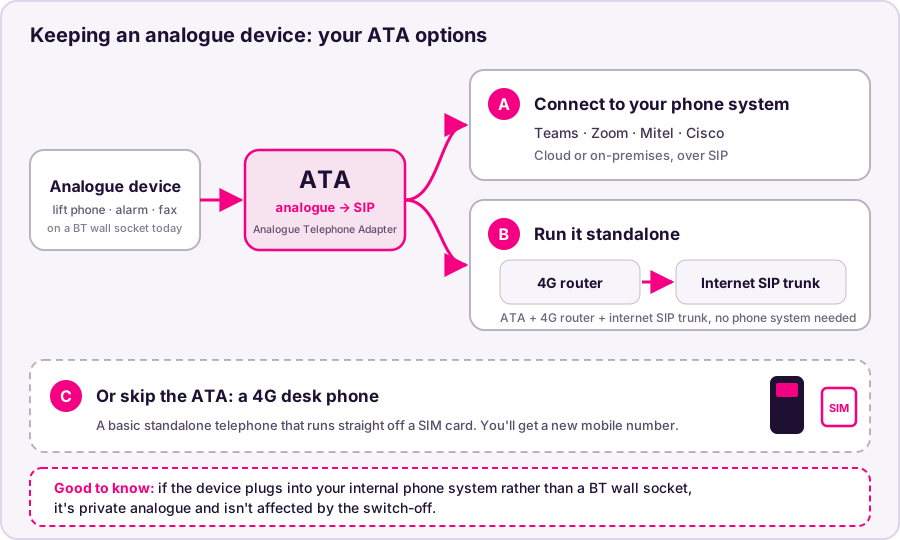
Your options for keeping an analogue device alive
Good to know: If your analogue device already plugs directly into your internal telephone system rather than a BT wall socket, you do not need to worry. That operates as a private analogue solution and will not be affected by the switch-off.
What if your phone system uses ISDN2 or ISDN30?
If your core telephone system (PBX) is connected via ISDN2 or ISDN30, you might feel like you are completely kippered.
Thankfully, you still have two viable options to get sorted in time.
Option 1: Move to a new cloud phone system
If your business already uses platforms like Microsoft Teams or Zoom, you can migrate your telephony straight into those ecosystems.
The catch: With only 90 days on the clock, time is tight. If you have hundreds of physical handsets, complex call routing, or software integrations, a full migration might be a squeeze. Porting your existing phone numbers across in time can also be tricky if there are any administrative hold-ups.
Option 2: Move to SIP via an ISDN gateway
If a full system overhaul isn’t realistic right now, a SIP-to-ISDN Gateway is your best lifeline. The gateway sits between your existing PBX and a new SIP provider, doing all the digital conversion in the background. As far as your legacy phone system is concerned, it is still connected to ISDN, meaning nothing changes for your staff or your day-to-day setup.
The catch: Even with a gateway, you still have to port your phone numbers from your legacy ISDN lines to your new SIP trunks. Moving numbers between different providers typically carries a 28-day lead time, which eats up nearly a third of your remaining 90 days before you even factor in ordering hardware and booking an engineer.
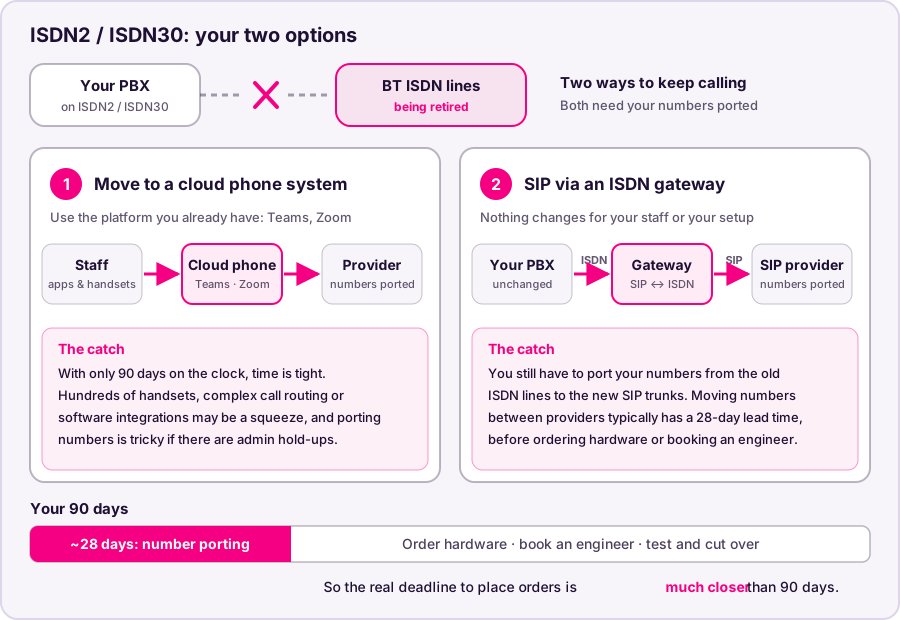
Your two ISDN options, and what number porting does to your 90 days
Next steps
With number porting lead times taking up to a month, the effective deadline to place orders is much closer than 90 days. Audit your wall sockets today, check your billing statements for hidden analogue lines, and speak to your telecoms provider before the engineering queues fill up.