This simple script will summarise how many users are assigned each policy in Lync as well as how many users are against each registrar pool.
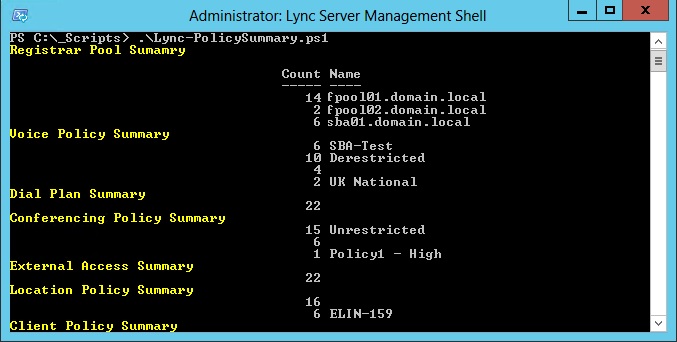
# Author: Created by Weakest Lync, www.WeakestLync.com
# Purpose: Script to show the number of users assigned each policy
# Version: 1.0
# Changes: DATE - Change
# 09/11/2014 - Release 1.0

$users = Get-CsUser

Write-Host "Registrar Pool Sumamry" -ForegroundColor Yellow
$users | Group-Object RegistrarPool | Select-Object Count, Name
Write-Host "Voice Policy Summary" -ForegroundColor Yellow
$users | Group-Object VoicePolicy | Select-Object Count, Name
Write-Host "Dial Plan Summary" -ForegroundColor Yellow
$users | Group-Object DialPlan | Select-Object Count, Name
Write-Host "Conferencing Policy Summary" -ForegroundColor Yellow
$users | Group-Object ConferencingPolicy | Select-Object Count, Name
Write-Host "External Access Summary" -ForegroundColor Yellow
$users | Group-Object ExternalAccessPolicy | Select-Object Count, Name
Write-Host "Location Policy Summary" -ForegroundColor Yellow
$users | Group-Object LocationPolicy | Select-Object Count, Name
Write-Host "Client Policy Summary" -ForegroundColor Yellow
$users | Group-Object ClientPolicy | Select-Object Count, Name
Write-Host "Archiving Policy Sumamry" -ForegroundColor Yellow
$users | Group-Object ArchivingPolicy | Select-Object Count, Name
Write-Host "Pin Policy Sumamry" -ForegroundColor Yellow
$users | Group-Object PinPolicy | Select-Object Count, Name
Write-Host "Mobility Policy Sumamry" -ForegroundColor Yellow
$users | Group-Object MobilityPolicy | Select-Object Count, Name
Write-Host "Persistent Chat Policy Sumamry" -ForegroundColor Yellow
$users | Group-Object PersistentChatPolicy | Select-Object Count, Name
Write-Host "Hosted Voicemail Policy Sumamry" -ForegroundColor Yellow
$users | Group-Object HostedVoicemailPolicy | Select-Object Count, Name
4 comments
Good job, It's really helpful when you need a quick glance. - Lakmal-
I took a pass to try to make this a bit easier to read each of the policies and reduce the amount of repeated code. This is what I came up with and feel free to use it.
Note:the policy array requires the names to match the properties you'd like to expand.
$policies = @(
"Registrar Pool"
"Voice Policy"
"Dial Plan"
"Conferencing Policy"
"External Access"
"Location Policy"
"Archiving Policy"
"Pin Policy"
"Mobility Policy"
"Persistent Chat Policy"
"Hosted Voicemail Policy"
)
$users = Get-CsUser
ForEach ($p in $policies) {
Write-Output "$p Summary" -ForegroundColor Yellow
$users | Group-Object $p.Replace(" ","") | Select-Object Count, Name
}
Much cleaner, thanks!
The only problem with this script, that it only considers USER objects.
You are missing however the usage statistics for CommonAreaPhones, LyncMeetingRooms, ResponseGroupWorkflows (voicepolicy is usually assigned to RGS workflows if call restrictions are applicable)...
Pingbacks
Comments are closed.