I recently started building a Lync 2013 Pilot Pool alongside my Lync 2010 deployment. When publishing the topology I got the following errors:
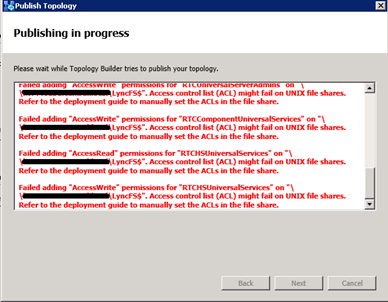
_Publishing in progress
_
_Failed adding “AccessWrite” permissions for “RTCComponentUniversalServices”
Failed adding “AccessRead” permissions for “RTCComponentUniversalServices”
Failed adding “AccessWrite” permissions for “RTCHSUniversalServices”
Failed adding “AccessRead” permissions for “RTCHSUniversalServices”
Failed adding “AccessWrite” permissions for “RTCUniversalServerAdmins”
Failed adding “AccessRead” permissions for “RTCUniversalServerAdmins”
_
_Access control list (ACL) might fail on UNIX file shares. Refer to the deployment guide to manually set the ACLs in the file share.
_
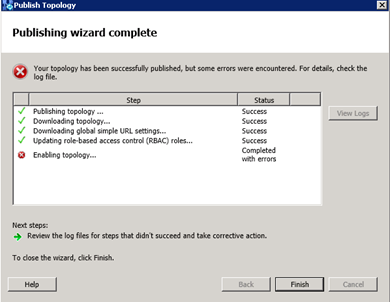
When the Publishing wizard is complete you see the error:
_Enabling Topology… Completed with errors
_
When you view the log file you see the following errors for the Lync File Share:
ACLError: Access permissions error.
Error: Failed to save permissions on “\server.domain.localLyncFS$”.
Updated Fix: When running Topology Builder, right click and “Run As Administrator”. Thanks to Dave in the comments below.
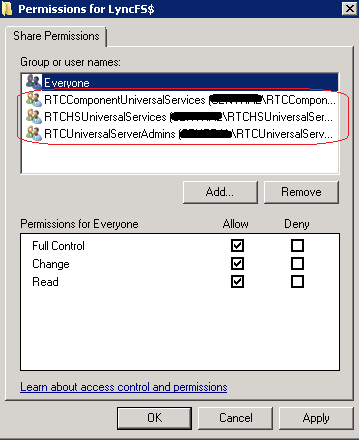
To fix this I had to add the following groups to the Share (Not NTFS) permissions on the Lync File Share. I had to do this even though Everyone had Full Control on the Share Permissions. Topology Builder would fail publishing the topology until I added these groups on.
RTCComponentUniversalServices
RTCHSUniversalServices
RTCUniversalServerAdmins
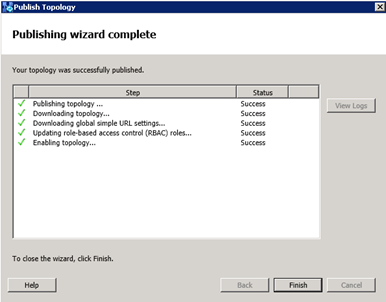
After changing the Share permissions, the topology published successfully:
10 comments
I encounter the same problem. I don't know why the "Everyone" group permission is not working perhaps something to do with the grouping permission in the grouping setting in AD.
This post resolved my problem, also I had to add another group RTCUniversalConfigReplicator.
Thanks for the post.
Jessica
Thank you for the info Jessica, it's a very odd problem!
You also need remove the NTFS right if you put those groups in.
After trying a bunch of published solutions including the ones above and all not working, I found that opening the Topology Builder with a right-click "run as administrator" helped resolve this for me.
Thanks for the info Dave! Sounds like a much easier solution.
Very good answer, thank you!
I confirm it works
You are 100% right Dave, I just did that and it work, good answer Dave
my problem is about enable cs-topology :
<< a trusted service with the type"qos" and the fully qualify domain name ---- was found for a previouse server version .
tnks man, but i need to also add:
RTCComponentUniversalServices
RTCHSUniversalServices
RTCUniversalServerAdmins
RTCUniversalConfigReplicator
Comments are closed.