I was recently working for a customer where their security policy prohibited traffic from the internet terminating on servers within the LAN.
Skype for Business (Including previous versions Lync and OCS) uses a Reverse Proxy to terminate web requests within the DMZ and re-write the requests to the Front End Pool(s) within the LAN. The request is received on TCP/443 (HTTPS) and sent to the Front End VIP on TCP/4443. In the case of Standard Edition servers the request would be direct rather than to the Hardware Load Balancer. See diagram below:
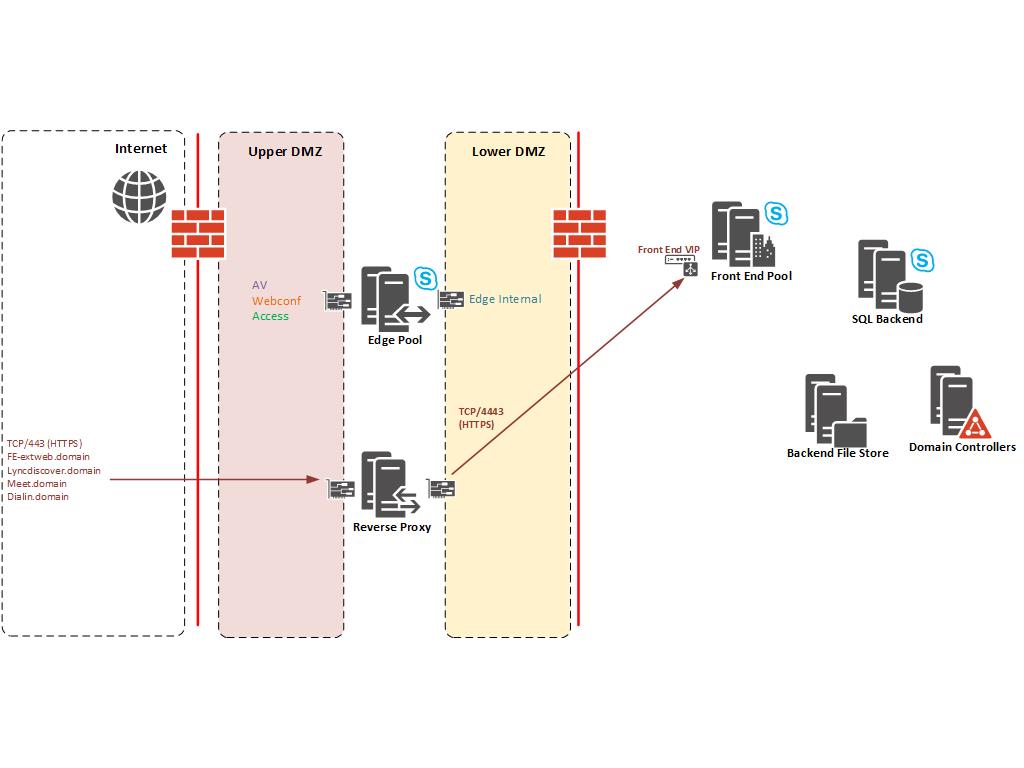
The customer and their security consultant deemed this as violating their security policy as external traffic from the Internet is ultimately serviced by a server on the LAN (It makes an interesting debate but not discussing it here).
The simple URLs (lyncdiscover, meet and dialin) are accessed anonymous where as external traffic to the Front End Pool External Web Services handles authentication and is authenticated thereafter. The Microsoft solution is to deploy a Director Pool to handle anonymous traffic and authentication. However, Director Pools are domain joined and would usually be deployed on the inside of your Firewalls (Datacentre LAN).
This would still violate the customers security policy and on top of that each Front End Pool still has it’s own External Web Services URL which absolutely must terminate on the Front End pool. There is no method to avoid HTTPS traffic from external users on the Internet not hitting the Front End Web Services (GAL downloads etc).
The compromise was to deploy a Director pool within the DMZ to handle all unauthenticated HTTPS requests. In this solution internal LAN users do not use the Director Pool and all internal DNS records point to the Front End pool. This Director pool is purely for external users only.
After digging around on Technet and looking at the Skype for Business Protocol and Workloads poster I came up with a list of ports that would be required for the Director pool to work correctly. Some things were missing (Mainly the Backend SQL and File Store as CMS replication would not work). It’s also worth noting that the Director Pool is on the same DMZ network as the Internal Edge so I didn’t need rules between Edge Pool and Director Pool. Diagram with ports required below:
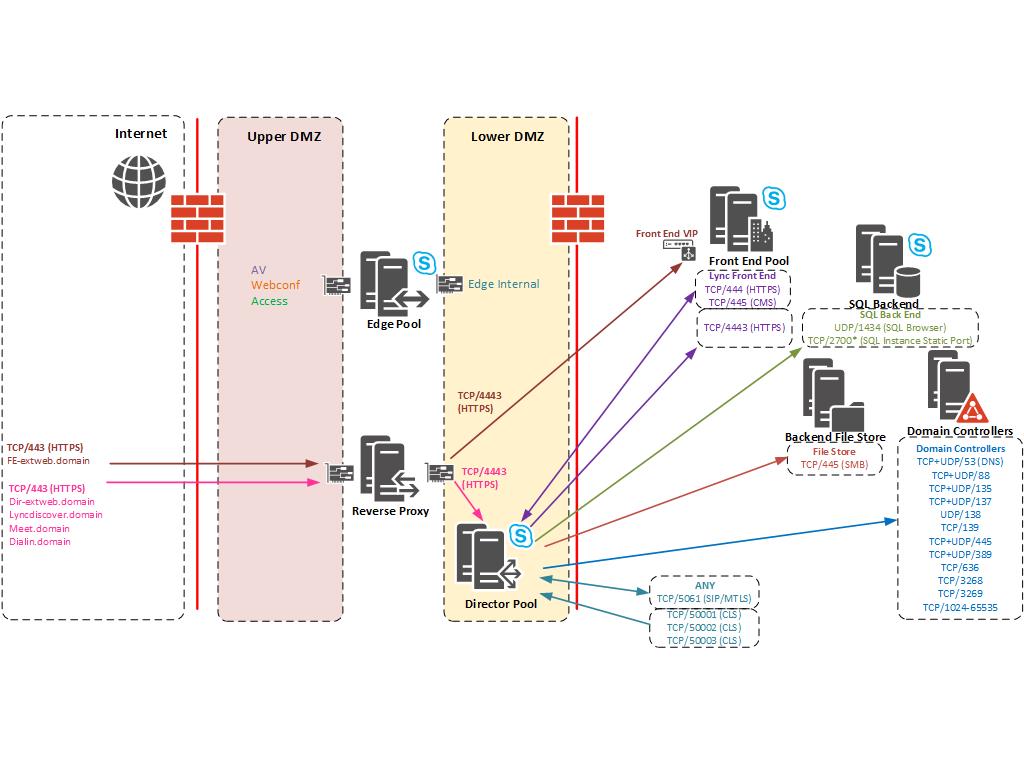
*SQL TCP Port - In my example the SQL Instance had a static port of TCP/2700 set. You should configure the Backend SQL to use a static port and amend appropriately.
You can see that the Director Pool is now handling all anonymous HTTPS traffic from the simple URLs and handles authentication.
We still need the rule in place for the Front End Web Services but this will be authenticated traffic. You could argue that by having rules from the DMZ into the corporate Active Directory/SQL server and File Server has “Bridged” security zones and less secure. Ultimately this solution satisfied a security requirement and I hope it helps you if you run into the same problem.
2 comments
I do sometimes wonder about the ability of Infosec or security consultants abilities to really pragmatically access and appraise perceived security threats, rather than repeat parrot fashion their Infosec policy, which was likely created years ago, is probably out dated, and certainly in your case is ignorant to how SfB behaves under the hood.
Any security consultant worth their salt who has a rudimentary knowledge of AD should know a domain joined member should not reside in a DMZ.
Therefore rather than have rigid inflexible principles, that in the case of SfB by having a director in a DMZ potentially increases security risk by turning your fw into swiss cheese, surely its better to understand how the application (SfB) works along with how SfB secures traffic at the application layer. As the reality is terminating traffic in the DMZ hasn't made the deployment more secure. In actuality its probably made it less secure, as if the director is compromised an attacker will have access to your internal network too.
I totally agree Shawn.
I had the debate and my view is Microsoft know the best security principles for their products. A Reverse Proxy is used to terminate the TCP session within the DMZ, not joined to the corporate domain and only has one TCP port (4443) open to inside your network.
A Director Pool is the solution to offload Authentication and Anonymous URLs but it should reside on the datacentre LAN, with the Front End pool.
Comments are closed.